
Note it is recommended to have the information below available for each new employee.
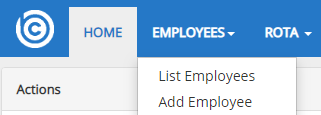
On the Navigation bar go the Employees, Add employees
In LOCATION :
Allocate the new employee to a Branch from the drop down menu, and the department they are going to work in.
IN PERSONAL INFORMATION:
Fill in personal information (note the below information is essential for the software to produce accurate information):
- Name
- DOB
- Gender
- Marital status
In CONTACT DETAILS:
- Address
- Phone number
- Email address
In EMPLOYMENT DETAILS:
Job Title,
National Insurance number,
Date of joining,
Access level (depending on their role in the business- they may have access to the personal and financial information of other employees).
Existing payroll number can be entered if transferring from a previous payroll system.
NEXT OF KIN:
Next of Kin details – Name, address and telephone no.
RIGHT TO WORK: – choosing the Nationality from the drop down list. Depending on the nationality will determine the type of work permit.
Select the permit type from the drop down menu.
CLICK :
Payroll information : Payroll frequency (how often the worker gets paid), contracted hours per week, student loan ( and Plan type), contract type (hourly rate or salary) and the amount (either hourly rate or annual salary.
Payment information – cash/cheque/bank transfer
Bank details required for bank transfer payments.
To complete, enter the employee’s P45 information or New Starter checklist
Click on “Employer (You)” then you will be asked to either file a P45 or fill in the New Starter Declaration form copying what was provided by the employee on their New Starter Forms.
If New Starter Forms are yet to be provided by the new employee select “Employee (New Joinee)” and they will get sent an email with a link so that they can complete the filing of these documents.
Comments
0 comments
Please sign in to leave a comment.